
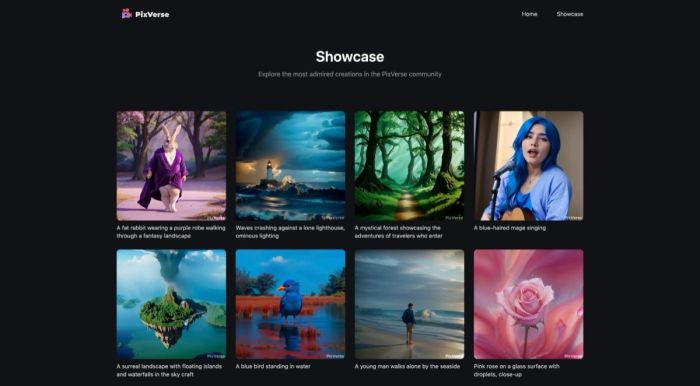
Pixverse
Pixverse is an AI-powered video generation platform that transforms text prompts, static images, or character inputs into polished short videos in seconds. Designed for creators who need quick, professional-looking content without traditional video editing skills, Pixverse specializes in text-to-video and image-to-video transformations that output at up to 1080p resolution. The platform achieves remarkable speed—generating clips in as little as 5-10 seconds—while maintaining quality that rivals more complex workflows. Its strength lies in accessible video creation: users can animate characters with lip-sync, apply creative effects like Zombie Mode or AI Dance Revolution, control camera movements with dolly zooms and tracking shots, and extend existing clips using keyframe controls. The interface remains beginner-friendly despite these advanced capabilities, making it a viable option for social media managers, educators, marketers, and casual creators alike. However, users should understand its sweet spot: short-form content typically in the 5-8 second range, which suits Instagram Reels, TikTok clips, and promotional micro-videos but falls short for longer narratives. Here's what you need to know before signing up.
Key Features
- Text-to-Video Generation: Create videos from text prompts with controllable camera movements including dolly zooms, pans, and tracking shots for cinematic results.
- Image-to-Video Animation: Transform static images into dynamic clips with physics simulation and realistic motion synthesis that respects image composition.
- Video Extension & Keyframes: Extend existing clips and use start/end keyframe controls to build precise narratives across multiple segments.
- Creative Effects Library: Access unique effects like Zombie Mode, AI Dance Revolution, Lego Blast, and Magic Transformations for viral-ready content.
- Character Animation & Lip-Sync: Animate characters with accurate lip-syncing to audio, suitable for storytelling and avatar-based content.
- Fusion Mode: Combine up to three images into a single coherent video, enabling creative transitions and composite scenes.
- Style Selection: Choose from realistic, anime, 3D, or cinematic styles to match your project requirements and aesthetic preferences.
- AI Voiceovers: Generate voice narration directly within the platform to accompany your video creations.
Pricing & Plans
Pixverse operates on a freemium model with a free tier that provides credits for initial experimentation and notably includes no watermark on outputs—a rare advantage among free AI video generators. Paid plans start at approximately $8/month, unlocking additional credits and faster rendering queues for heavy users. The free tier is generous enough for casual testing and light personal use, but creators producing content regularly will likely need a paid plan to avoid credit limitations. Compared to competitors like Runway ML or Pika Labs, Pixverse's pricing is competitive, especially considering the no-watermark free option and the breadth of features included in base plans. The value proposition is strongest for users focused on short-form content who need quick turnarounds without significant financial commitment.
What works well:
- Exceptional rendering speed—videos generate in 5-60 seconds, far faster than most competitors
- High-quality output at 1080p with realistic motion and smooth physics simulation
- No watermark on free tier, unlike many alternatives that force branding
- Beginner-friendly interface requiring no video editing experience
- Diverse creative effects library enables viral content creation
- Precise camera controls and keyframe editing for custom narratives
- Multiple style options including anime-specific generation
Where it falls short:
- Limited to short clips—best results in 5-8 second range, unsuitable for longer content
- Complex or detailed prompts can produce inconsistent or artifact-heavy results
- Free tier credit limits restrict heavy or professional usage
- Not ideal for multi-character scenes or complex narrative storytelling
- Occasional visual artifacts in advanced creative effects
Who It's For
Pixverse serves content creators producing short-form social media content, marketers needing quick promotional clips, educators building explainer videos, and social media users wanting to create viral effects without technical skills. It's particularly well-suited for beginners who lack video editing experience but need professional-looking results fast. The platform excels at single-subject animations, product showcases, storyboard previews, and creative experiments. However, professional video editors seeking long-form content or complex multi-scene narratives should look elsewhere—Pixverse is optimized for quick, self-contained clips rather than ambitious productions. Anime creators will appreciate the dedicated style options, while businesses requiring bulk video generation will find the credit system a potential bottleneck without a paid plan.
The Bottom Line
Pixverse delivers impressive AI video generation in a remarkably accessible package. Its combination of speed, quality, and no-watermark free tier makes it a standout choice for short-form content creation, particularly for social media professionals and casual creators. The main trade-off is clip length—it's designed for quick clips rather than ambitious narratives. Users who need 5-15 second videos with minimal fuss will find excellent value here, especially at the affordable $8/month starting price. For longer projects or more complex prompt adherence, alternatives like Runway ML or Kling AI may better serve advanced needs, but Pixverse dominates its specific niche with compelling ease-of-use.
Отзывы